|
5
Adding Formulas to JClass PageLayout
Introduction
util.formulae's Hierarchy
Operations
5.1 Introduction
The formulae package in com.klg.jclass.util has special capabilities for working with mathematical objects. Similar to the way that objects such as
java.lang.Doublewrap a primitive type, those in com.klg.jclass.util.formulae encapsulate mathematical expressions (operators) whose operands may be scalars, vectors (in the mathematical sense), and matrices. These objects may then be stored as the generalized values of cells in a JClass PageLayout table, or in a JClass LiveTable, where they may be evaluated at run time to produce results based on the then-current data.In addition, subclasses of
MathValue, which are wrappers for generalized scalars, vectors, and matrices, provide several methods for converting an expression to a value and to a String, as well as other methods useful when dealing with these objects.
5.2 util.formulae's Hierarchy
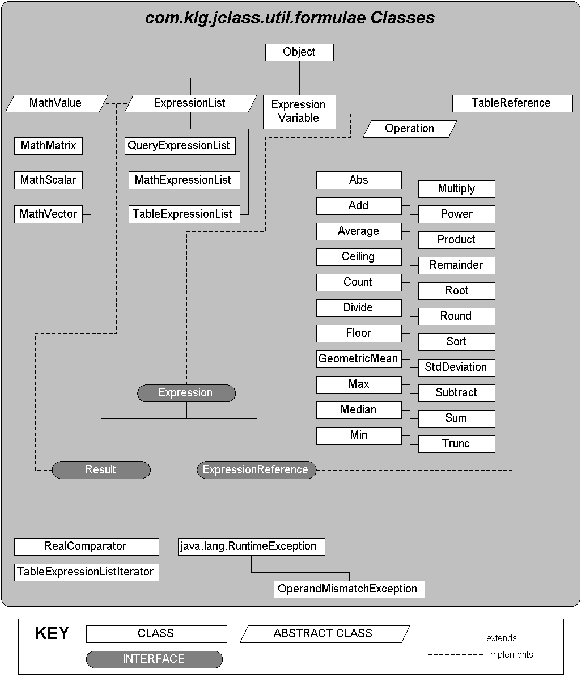
The interfaces, abstract classes, and derived classes, including possible exception classes, are shown in Figure 20.
Figure 20 : The inheritance hierarchy for com.klg.jclass.util.formulae.
The diverse set of mathematical operations permit you to compose complex mathematical formulas and provide references to them.
5.3 Expressions and Results
The top-level interface for the com.klg.jclass.util.formulae package is
Expression, whose sole method isevaluate(). Any object that functions as an expression must have anevaluate()method that knows how to operate on data that might be a scalar, a vector, or a matrix. Applying theevaluate()method to anExpressionproduces aResult, which is a marker interface that identifiesExpressiontypes which are valid return types from the evaluation of otherExpressions.An
Expression f = new Add(op1, op2);Expressionmay be anOperation, as inwhich, after evaluation, returns a
Result.
5.4 Math Values
The abstract class
MathValueforms the root for all derived constant-based result/data classes. It satisfies theExpressioninterface by defining anevaluate()method, which simply returns theMathValueas aResult. Its concrete subclasses areMathMatrix,MathScalar, andMathVector. BecauseMathValuehas anevaluate()method it is anExpression. Thus,MathValues may be passed asExpressionobjects.MathValue Methods
Note: The subclasses of
MathValueoverride all but the first method. Since, for example,matrixValue()is not appropriate to aMathScalar, it throws anUnsupportedOperationExceptionif it is called. Other method-data type mismatches also throwUnsupportedOperationExceptions. The method tables for the subclasses indicate which methods are data type mismatches for the given class.
5.4.1 MathScalar
double s1 = 10.0; MathValue ss1 = new MathScalar(s1);
MathScalaris a scalar constant represented as aMathValue. By encapsulating it in this fashion it can support integer and real numbers, and it can be extended if necessary to support other types of scalar numbers. Its data field is arealValue, aNumberthat is output based on the currentdataFormatkept inMathValue.MathScalar Constructors
The no-argument constructor
MathScalar()creates an instance that encapsulates the value 0.0, while the other three constructors take adouble, anint, or ajava.lang.Numberargument.MathScalar Methods
5.4.2 MathVector
double[] ed = {2.71828, 3.1415927, 1.6020505};
MathVectoris a representation of the class of vectors in a linear algebra sense. They may also be used as operands in matrix multiplication. AMathVectorencapsulates a list of values which may be integers, doubles, or more generally, objects of typeNumber. It has methods for retrieval or modification of a value at a particular index, and for outputting the list as a String. The operators discussed in the next section accept these objects as operands. For example:
MathValue mv = new MathVector(ed);MathVector Constructors
The constructors for
MathVectorparallel those forMathScalar, except they take arrays as parameters rather than single values.MathVector Methods
5.4.3 MathMatrix
double[][] m1 = {{1.1, 1.2, 1.3},
MathMatrixis a representation of the class of matrices, again in the sense of linear algebra. The package implements the basic addition and multiplication operations in matrix algebra, including multiplying a matrix by a vector. It has methods for retrieval or modification of a value at a particular pair of indices, and for outputting the matrix as a String. The operators discussed in the next section accept these objects as operands. For example:
{2.1, 2.2, 2.3},
{3.1, 3.2, 3.3}};
MathValue mm = new MathMatrix(m1);MathMatrix Constructors
The constructors for
MathMatrixparallel those forMathScalar, except they take 2D arrays as parameters rather than single values.MathMatrix Methods
5.5 Operations
The abstract
double[] ed = {2.71828, 3.1415927, 1.6020505};Operationclass defines the basic elements of an operator. Binary operators have a left and right operand, which enables the correct ordering to be applied to matrix operations and any other non-commutative operators. Unary operators have a single operand. For example:
double[] rd = {(Math.sqrt(5.0) + 1.0) / 2.0, 4.0, 32.0};
MathValue e = new MathVector(ed);
MathValue r = new MathVector(rd);
Expression add = new Add(e, r);Operation Constructors
There is a no-argument constructor that creates a generic operator, and there are constructors for every unary and binary permutation of
Expressions andNumbers. A sample constructor is:Operation(Expression left, Expression right).Operation Methods
5.5.1 The Defined Mathematical Operations
Unary Operators
Unary operators take one parameter, which is either an
Expressionor aNumber. Because they areExpressions they all have anevaluate()method which returns aResult.Binary Operators
Binary operators take two parameters, which are either
Expressions or aNumbers. Because they areExpressions they all have anevaluate()method which returns aResult,
5.5.2 Reducing Operations to Values
Since
double edd = 2.0;Operations areExpressions, they all have anevaluate()method. Evaluation returns aResult, which may be converted to a String for printing. Here is an example:
double exp = 8.0;
MathValue eddy = new MathScalar(edd);
MathScalar expy = new MathScalar(exp);
double[] ed = {2.71828, 3.1415927, 1.6020505};
MathValue e = new MathVector(ed);
Expression pow = new Power(eddy, expy);
Expression powr = pow.evaluate();
// Either one of these has a toString() method
System.out.println("Power without evaluate(): " + pow);
System.out.println("Power with evaluate(): " + powr);After which the following is written on the output:
Power without evaluate(): com.klg.jclass.util.formulae.Power@eb4f3b8c
Power with evaluate(): 256.0You see that calling
evaluate()is necessary to have a value returned by the implicittoString()call.
5.6 Expression Lists
Expression lists are handy containers that permit you to perform an operation on a group of values.
MathExpressionList
The example shown here uses the binary form of
// Expression ListsAddto find the grand total of all the elements in twoExpressionLists.
Expression[] exprs1 = {null, null, null, null, null, null, null, null, null, null};
for (int i = 0; i < 10; i++){
exprs1[i] = new MathScalar(95 + i);
}
ExpressionList explist1 = new MathExpressionList(exprs1);
Expression[] exprs2 = {null, null, null, null, null, null, null, null, null, null};
for (int i = 0; i < 10; i++){
exprs2[i] = new MathScalar(95 + i);
}
ExpressionList explist2 = new MathExpressionList(exprs2);
sss1 = new Sum(explist1, explist2);
ssss1 = sss1.evaluate();
System.out.println("Summing ExpressionLists with evaluate(): " + ssss1);
Summing ExpressionLists with evaluate(): 1990QueryExpressionList
A
QueryExpressionListis designed as a wrapper for a set ofExpressions stored in a JDBC-typeResultSet, that is, the result of a database query. Users of JClass DataSource may also use this facility.TableExpressionList
Expression lists may be used to extend data from portions of a JCPageTable to produce summary reports. See Section 5.8, Using Formulas in JClass PageLayout, for details.
5.7 Exceptions
OperandMismatchException
Various operations such as adding a number to a vector are not defined, whereas other operations such as multiplying a vector by a number can be interpreted as a scaling operation. At compile time numbers, vectors, and matrices can be declared as generic
Expressions, making it impossible to predetermine which operations are not permitted. A run time check of the validity of an operation must be made. If a mathematical construct is evaluated and found to be illegal, the class throws anOperandMismatchException.ClassCastException
There are cases where a run time class cast exception may occur. While most of these should be avoidable by selecting the correct class (such as using
Productrather thanMultiplywhen multiplying two vectors) the fact that both takeExpressions as their parameters makes it difficult to avoid the possibility of an end user passing in an incorrect type if your application permits flexible user input. You may permit substitution of one arithmetic class for another, since they are allOperations. This also opens the door to class cast exceptions.If the possibility exists for either of these exceptions, your code should attempt to handle it.
5.8 Using Formulas in JClass PageLayout
5.8.1 Performing a Mathematical Operation on a Range of Cells
Expression Lists and Expression References
Expression list objects hold a group of
Expressions.ExpressionListis an abstract class whose methods permit the inclusion of additional elements to those already present, a method for removing elements or clearing all elements, for retrieving an element, and for comparing with another list. These operations are common to the concrete classesMathExpressionList,QueryExpressionList, andTableExpressionList.Expression lists may be used as arguments for all mathematical operations. When given an expression list, evaluating a unary operator such as
Absreturns a list containing the absolute values of its input list. Binary operators may return a single result or a list. Given expression lists, the mathematical operatorsAbs,Add,Ceiling,Divide,Floor,Multiply,Power,Remainder,Root,Round,Sort, andSubtractreturn lists, whileAverage,Count,GeometricMean,Max,Median,Min,Product, andSumall return a single result afterevaluate()has been called on them.Use
Expression expression = new TableExpressionList(TableExpressionListto perform an operation over a range of cells in aJCPageTable. The following code snippet shows that the required parameters are a table data model and a block of cells.
pageTable.getTableData(),
new MathScalar(startRow), // first row
new MathScalar(endRow), // last row
new MathScalar(startColumn), // first column
new MathScalar(endColumn) // last column
);
Sum sum = new Sum(expression);The next code fragment places the formula for the sum in a selected cell. The formula is evaluated and the value of the sum is written to the designated cell.
pageTable.getCell(i, j).setCellValue(sum);The advantage of using
TableExpressionLists is that the formulas containing them can be evaluated after all table data has been filled in.
|
|